Entra ID Passkey Profiles in Public Preview
Table of contents
🚀 Passkey profiles in Public Preview
A Public Preview for Passkey Profiles in Entra ID just arrived. Which benefits are brought by Entra ID passkeys profiles?
Until now FIDO2 methods could have been restricted granularly only during authentication evaluation by using distinct authentication strengths targeting allowed FIDO2 AAGUIDs. So far we got the global authentication methods policy for restricting the registration of passkeys - on a global level. This resulted in potentially allowing registration of passkeys models which were not allowed during authentication.
Exploring the added value
Within this Public Preview up to 3 passkey profiles can be used - each scoped to either all users dynamically or security groups.
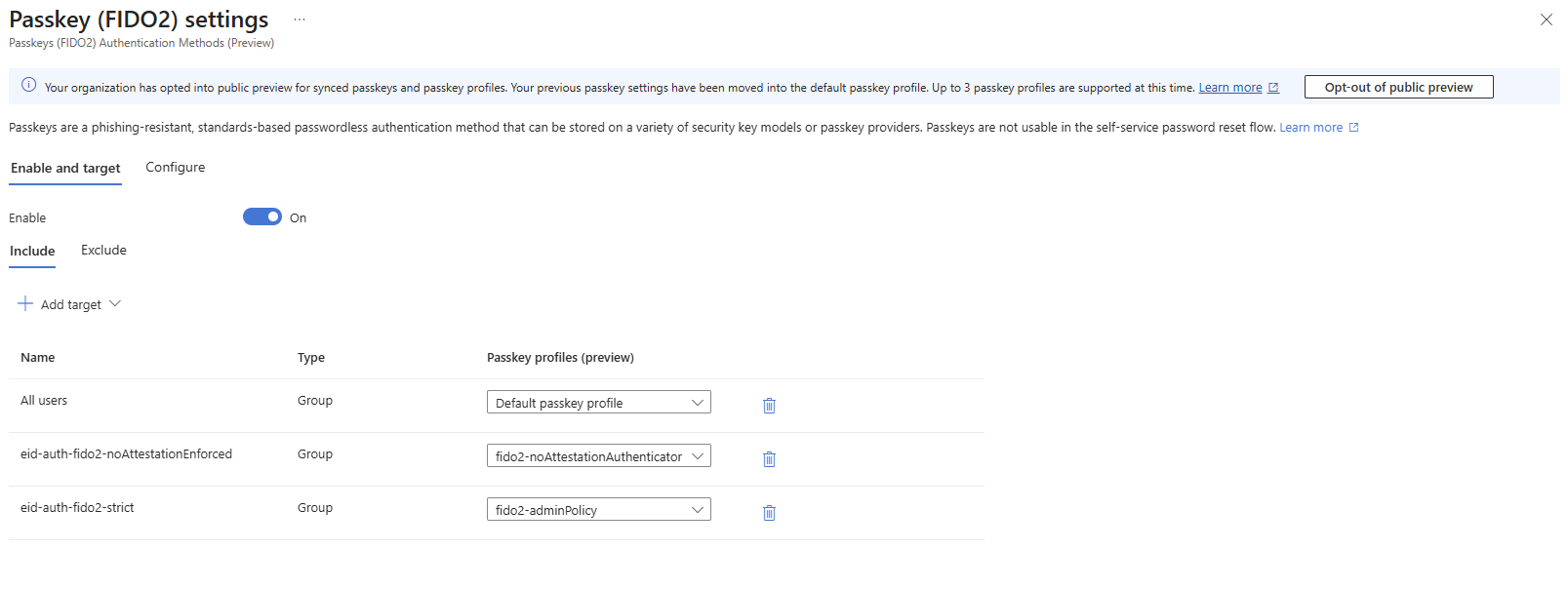
In general we got a single default passkey profile and can add two additional profiles. Details about the default passkey profile are given in the graph section of this post.
Passkey profiles can be scoped to multiple security groups. Matched passkey profiles will be evaluated cumulatively similar to Conditional Access policies. If there is a match for a given passkey in one of the assigned profiles, the user is allowed to register the model and authenticate with.
💡 Note This implies that an allow has precedence over not allowed respectively blocked passkeys when multiple profiles apply!
Besides using multiple profiles for staged rollouts and having a more strict, distinct profile for privileged accounts my intention is to enable passkeys for the whole organization by “catch-all, strict-unless” approach.
Practical example
In this scenario passkeys are enabled for “All users”. The default passkey profile enforces attestation and whitelists AAGUIDs of two FIPS-certified models with biometric unlock.
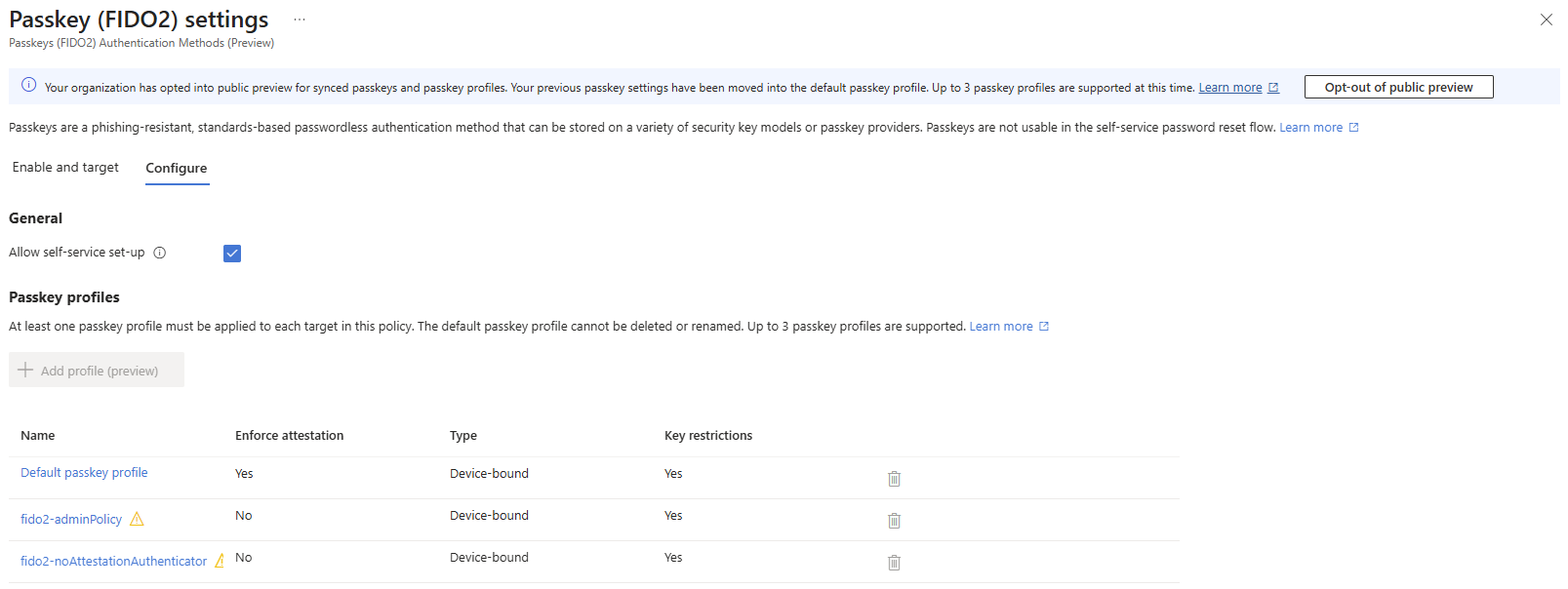
The other two profiles demonstrate configurations to distinguish passkey profiles for administrator, which my could allow any model with enforced attestation or specific models without attestation-enforcement like exampled above, and a profile for users. This profile in this example allows usage of Microsoft Authenticator passkeys without enforcement of attestation, which could come quite handy in initial rollouts of phishing-resistant authentication because of allowed cross-device authentication.
- Any user must only register attestation-enforced FIPS-certified or FIDO2 Level 3 certified passkey models
- Privileged accounts may use FIDO2 Level 2 certified passkey models
- Specific personas may use FIDO2 Level 1 certified passkey models or Microsoft-Authenticator passkeys
Illustrated in a alternate way strictest per default and lowering requirements upon dedicated assignments:
- Catch-all, strict-unless: FIDO2 Level 3 certified passkey models
- Distinct-privileged, strict: FIDO2 Level 2 certified passkey models or higher certification level
- Distinct-personas, less-strict: FIDO2 Level 1 certified passkey models and/or Microsoft Authenticator passkeys (which certification levels depend on operating system used)
Code-based configuration
I love digging into the Graph API getting to know an object’s structure, methods and limitations. Additionally, tracking of configuration-as-code is beneficial by many means. Let’s summarize the fido2AuthenticationMethodConfiguration, which is a substract configuration object of the total authenticationMethodsPolicy.
On a high level the configuration object has a simple structure and and I will just highlight few things that caught my attention.
| |
💡 Note For more details on specificy key-value-pairs or objects please refer to Microsoft Learn.
The key defaultPasskeyProfile defines the passkeyProfile user per default. In example above the passkeyProfiles are constructed by a single passkeyProfile: the “Default passkey profile” with guid 00000000-0000-0000-0000-000000000001.
Please not that the fido2authenticationMethodConfiguration will mimic the passkeysProfile defined as default on top level of the object itself - the fido2authenticationMethodConfiguration.keyRestrictions can be understood as backlinks to fido2authencitationMethodConfiguration.passkeyProfiles('00000000-0000-0000-0000-000000000001').
Using delegetated Policy.Read.All and Policy.ReadWrite.AuthenticationMethod permissions and the Graph beta endpoint the following PATCH is sent.PATCH https://graph.microsoft.com/beta/policies/authenticationMethodsPolicy/authenticationMethodConfigurations/fido2‚
| |
Verifying by a GET operation (and Policy.Read.All) you will notice the updated block of the AAGUID1 also on top-level:
| |
Practical example - as Code
To keep this post short you will find the payload from the above example within this section. Keep in mind to double- or even triple-check changes to avoid locking yourself out.
Click to expand: Example for "catch-all, strict-unless" FIDO2 passkey profiles
| |
Wrapping up
- Entra ID Passkey profiles bring more granular control for passkey registration restrications
- think of distinct policies on emergency access accounts, privileged accounts and workforce
- perhaps the current limit of 3 passkey profiles will be extended, which would be appreciated
References
- Check out the preview documentation at https://learn.microsoft.com/en-us/entra/identity/authentication/how-to-authentication-passkey-profiles